Wrike · Collaborative work management
Wrike implementation and support in South Africa
Most Wrike rollouts that disappoint were never configured. The software was switched on and the team was left to work the rest out.
Wrike is an enterprise collaborative work management platform for planning projects, tasks, resources and approvals. Automated Publishing Services (APS) is a Wrike Strategic Partner in South Africa and bills local clients in rand. APS configures Wrike around how your teams work, connects it to your other systems, trains your people and supports the system after go live.
The situation
- Wrike is switched on without being configured around the business that uses it.
- Approval chains do not mirror how sign off really happens.
- Intake forms do not stop work arriving as a scattered email thread.
- Dashboards do not show the one number a manager actually needs to see.
What we do
You probably did not go looking for a software category. You went looking for a way to stop chasing approvals. The analysts call it collaborative work management, and Gartner put Wrike at the top of that category in 2026, its fourth year running. The label matters less than whether the chasing stops.
Here is the part most partners leave out of the pitch. The criticism raised most often about Wrike, across more than four thousand public reviews, is that it is hard to learn. We are not going to pretend otherwise.
That complaint is rarely about the software. It is about a workspace nobody shaped around the people using it, and training that walked through features instead of jobs. A licence gives you the platform. It does not give you a system your team will still be using next year.
So that is the work. We shape the workspace around how your business actually divides and signs off work, connect it to the other systems you run, train people on their own workflow rather than a product tour, and stay involved after go live. APS is a local team you can get in a room, not a ticket queue.
Which brings us to the person who does that training. Michael Parrington runs onboarding, training and support on every Wrike account APS looks after. He has been a Wrike Certified Professional since November 2024, and Wrike confirms he is the only one in Southern Africa outside their own team. The part of Wrike people find hardest is handled by the person best qualified in the region to handle it.
Workspace architecture
Spaces, folders and projects structured around how your teams and departments actually divide work, not a generic template.
Approval and intake workflows
Request forms and approval chains configured to match your real sign off process, so work arrives structured instead of as a scattered email thread.
Resource and capacity planning
Workload views set up so managers can see who has capacity before assigning work, not after a deadline is missed.
Integration with your existing systems
Wrike connected to the DAM, PIM, ERP or publishing tools you already run, so status updates and data move without manual re-entry.
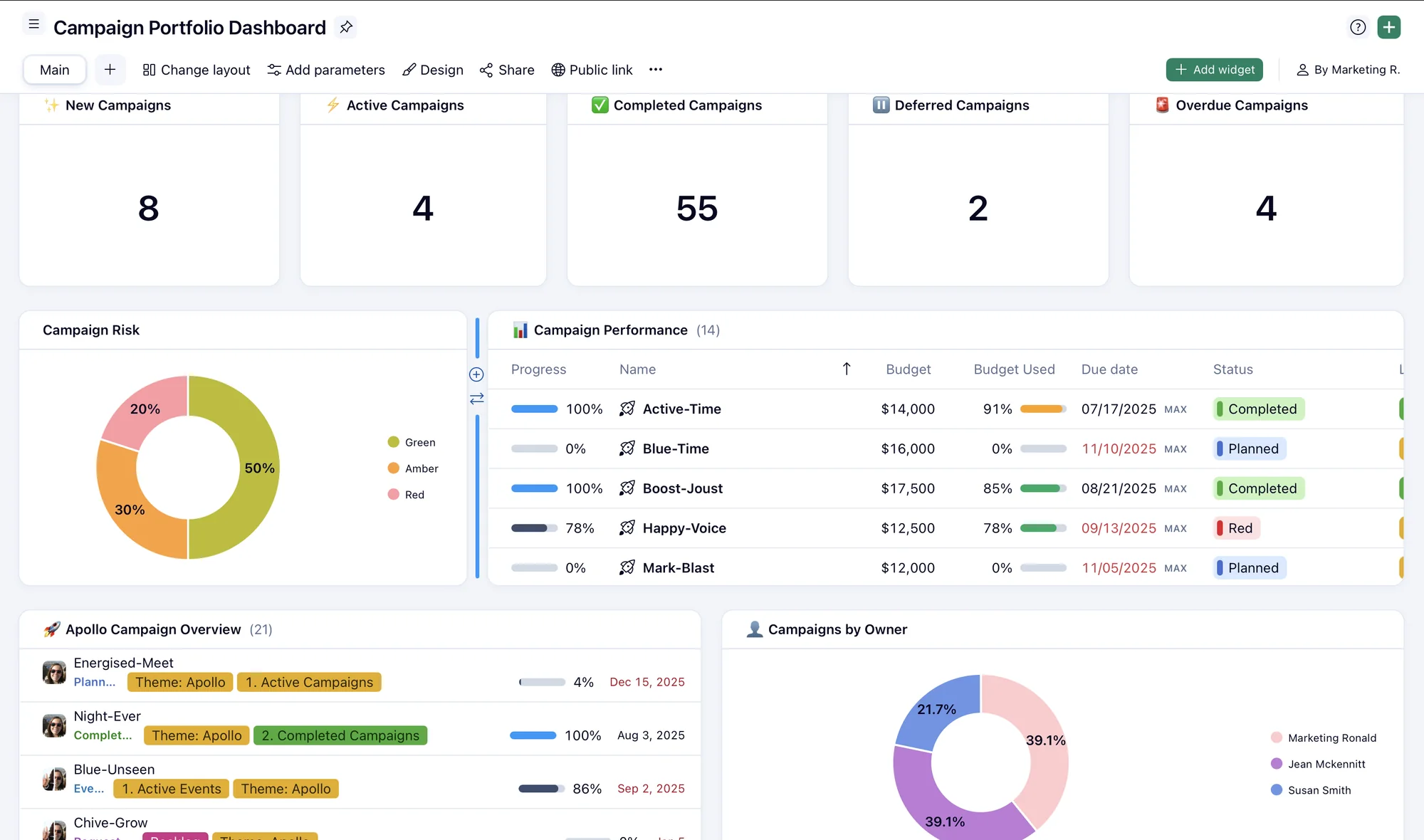
From first conversation to a workspace your team actually uses
Map the workflow
We map how work currently moves through your team: intake, approvals, handoffs, and where it breaks down.
Configuration and integration
We set up the Wrike workspace around that real workflow, and connect it to the other systems your team runs day to day.
Training and ongoing support
Your team is trained on the workflows set up for their actual job. We stay available after go live as your needs change.
Capacity planning and resource allocation
Ask a manager who has capacity next month. Watch how long the pause is. That pause is the problem, and no spreadsheet has ever fixed it for longer than about a week.
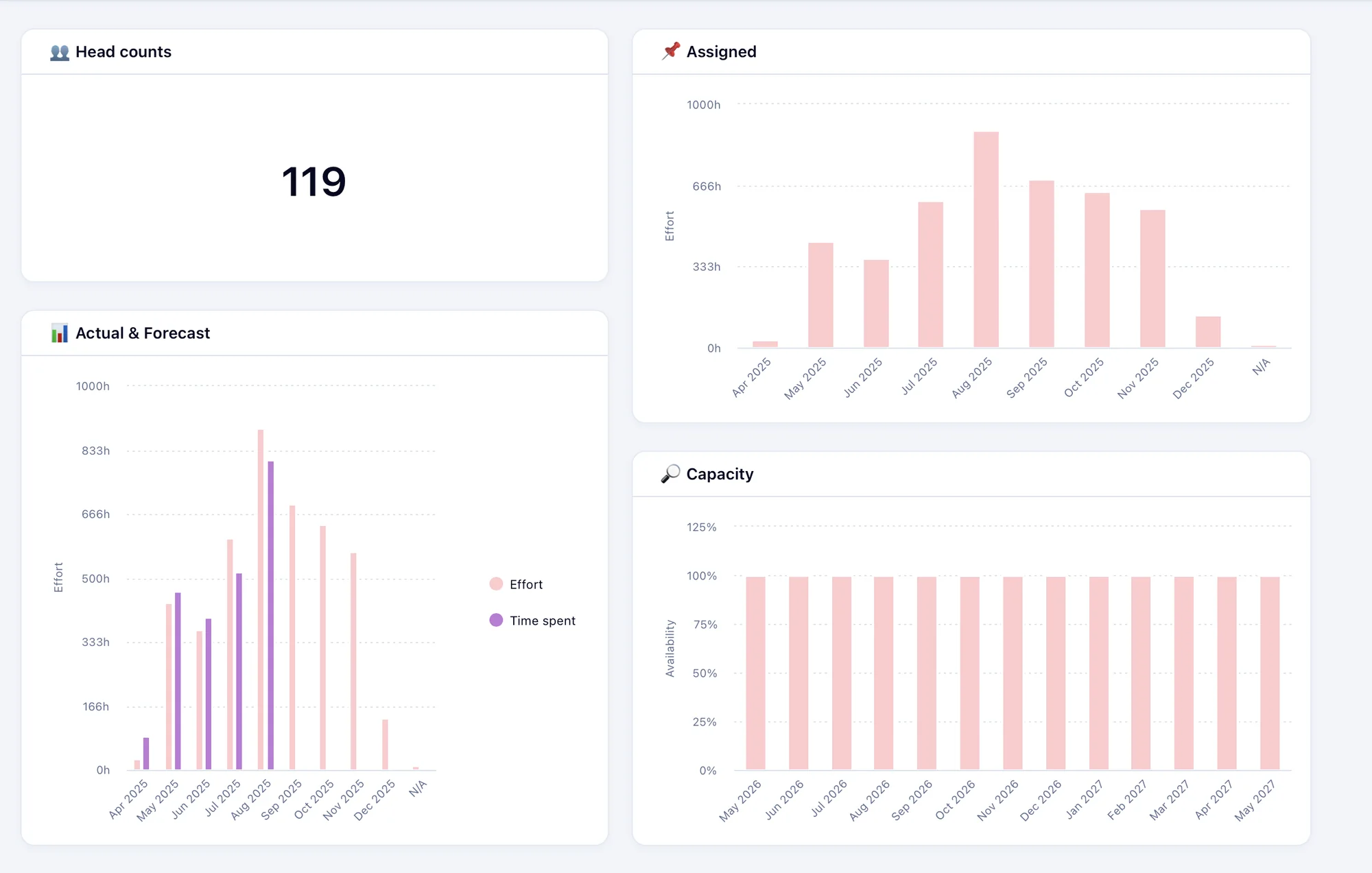
Wrike answers it from the work itself. Workload charts show every person, or every project, across a day, week or month view, with each person’s assigned effort totalled in hours, as a percentage, or as full time equivalents. Daily capacity defaults to eight hours and can be set per person where someone works a different schedule.
The detail that matters is work sitting outside the view you happen to be looking at. Wrike still shows it, shaded, against that person’s total. Without that, a manager sees their own project and assumes free time that is already committed somewhere else.
Over allocation is colour coded rather than worked out by hand. A cell turns red when a person’s total crosses their limit, including the work you cannot see from where you are standing. People can be grouped by job role or skill, so you can plan at the level of two designers and an editor before any individual name is attached. Unassigned work waits in a backlog you drag onto the chart when you know who is free.
One limitation worth knowing up front: workload charts need the Business plan or above. They are not in the Free or Team plans. If capacity planning is the reason you are looking at Wrike, that decides where your plan starts.
The setup is the part that decides whether any of this works. Capacity planning is only as good as the effort estimates, work schedules and job roles behind it, and those have to match how your organisation actually staffs work. That is configuration, and it is what APS does.
When Wrike is the right call, and when it is not
Wrike is the platform APS knows best, so of course we would recommend it. Which is exactly why the next part is worth reading. A tool your team quietly abandons costs more than anything you saved choosing it.
Wrike fits when
- Approvals are the bottleneck. Wrike handles multi stage approval chains and proofing on the asset itself, which is where marketing and creative teams lose the most time.
- You need to see capacity before you assign work, not after a deadline slips.
- Work arrives from outside the team and has to be captured in a structured way, through request forms rather than email.
- Reporting has to satisfy a PMO or an executive, across many projects at once, not just a team view.
- The platform has to connect to the other systems you run, a DAM, a PIM, an ERP or a publishing engine.
- You are in a regulated industry and need approval history that stands up to an audit.
Something else may fit better when
- You are a small team who needs a shared task list this week. monday.com or Asana will get you there faster and cost less to run.
- Your work is software development and nothing else. A purpose built engineering tool will suit your team better than a general work management platform.
- Price per seat is the deciding factor. monday.com, Asana and ClickUp all start lower than Wrike per seat, and we will not pretend otherwise.
- Nobody internally will own the system. Without an owner, any of these platforms becomes an expensive shared folder within a year.
- The real problem is that nobody agreed who approves what. No platform fixes that, and we would rather say so before you buy one.
If Wrike is not the right answer we will tell you, and we will tell you what we think is. That conversation costs you nothing.
What you get
- One system for every project, task and approval
- Approvals that clear without chasing
- Capacity you can see before you commit, not after a deadline slips
- Resourcing based on real availability across every project, not one
- Reporting that matches what is actually happening
- Billing in rand, and a local team in your time zone
Works well for: PMO teams, marketing operations, creative studios, transformation offices, financial services and pharmaceutical teams
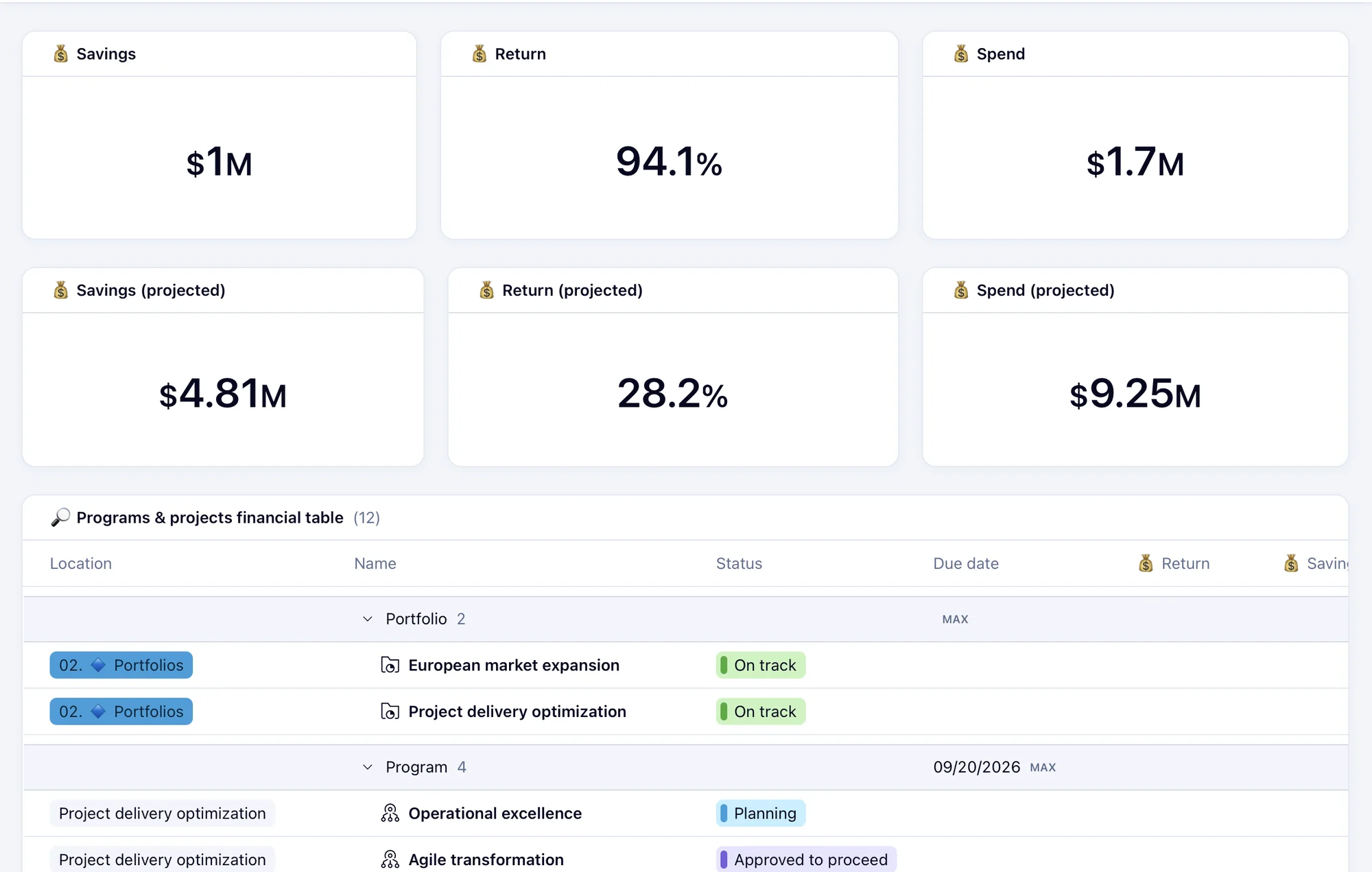
Proof
Time saved
~12hours a week
Manual effort saved in Cipla's multimedia team through Wrike workflow automation and simplified intake forms.
“I would readily recommend APS to any organization seeking a capable and collaborative Wrike implementation and support partner.”
“Based on our experience, I am happy to recommend APS and their services to organisations looking to implement Wrike or improve the way they manage their workflows and projects.”
Gartner Magic Quadrant, 2026
Wrike was named a Leader in the 2026 Gartner Magic Quadrant for Collaborative Work Management, published 5 October 2026. It is Wrike’s fourth consecutive year in the Leaders quadrant.
Capitec Bank
APS supported the full Wrike implementation, provides ongoing system and user support, and has done discovery work on other systems for the marketing department.
Babylonstoren
APS handled the acquisition, implementation, training and rollout of Wrike. The work started at the end of 2025.
Cipla
APS has supplied Cipla South Africa since 2014, and has supported Cipla's use of Wrike for roughly seven years.
Common questions
What is Wrike?
Wrike is an enterprise collaborative work management and project portfolio management platform. It centralises project planning, task management, resource allocation, approval workflows and reporting in one system. It is used by PMO teams, marketing operations, IT departments and enterprise transformation offices.
What is collaborative work management?
Collaborative work management is the software category covering how non engineering teams plan, assign, track, approve and report on work. It is the category Gartner assesses Wrike in. It differs from project management software in scope: it covers intake and approvals as well as the plan, and it is built for marketing, operations and PMO teams rather than developers.
Is Wrike hard to learn?
The learning curve is the criticism raised most often about Wrike in public reviews, where users commonly describe it as complex to navigate at first. In practice that usually reflects configuration and training rather than the software: a workspace that was never shaped around the teams using it, and training that covered features rather than the work people actually do. Scoping the workspace properly and training people on their own workflows is what APS is hired for.
How much does Wrike cost in South Africa?
Wrike publishes a free plan, Team at 10 US dollars per user per month and Business at 25 US dollars per user per month, both billed annually. Pinnacle and Apex are quoted on request. APS bills South African clients in rand. The licence is usually the smaller part of the cost. Configuration and adoption are what decide whether the system is worth paying for.
What happened to the Wrike Enterprise plan?
Wrike’s Enterprise offering split into two plans, Pinnacle and Apex. The current plans are Free, Team, Business, Pinnacle and Apex. If you are holding a quote or a document that refers to an Enterprise plan, it predates that split.
Does Wrike do resource and capacity planning?
Yes, and it is one of the stronger reasons to choose it. Wrike workload charts total each person’s assigned effort across a day, week or month, shown in hours, as a percentage or as full time equivalents. Capacity defaults to eight hours a day and can be set per person. Work from outside the project you are viewing is still counted against that person, and over allocation is colour coded rather than worked out by hand.
Which Wrike plan do I need for capacity planning?
Workload charts require the Business plan or above. They are not included in the Free or Team plans. If capacity planning is the reason you are looking at Wrike, Business is your starting point.
Can Wrike show us who is over allocated?
Yes. A person’s cell turns red when their total assigned effort crosses their capacity for that period, and that total includes work assigned outside the chart you are looking at. People can also be grouped by job role or skill, so you can see whether you have the capacity in a discipline before you commit to a date.
Can we plan work before we know who will do it?
Yes. Wrike lets you group by job role or skill and plan against the group, so you can commit to two designers and an editor before any individual is assigned. Unassigned work sits in a backlog you drag onto the chart once you know who is free.
Can we pay for Wrike in rand?
Yes. APS bills South African clients in rand, so your budget and procurement process are not exposed to exchange rate movement during the contract.
Why buy Wrike through APS rather than direct from Wrike?
The licence price is the same conversation either way. The difference is what happens after. APS configures the workspace around how your teams actually work, connects Wrike to your other systems, trains your people and supports them locally in your time zone. You also get billing in rand and a team you can meet in person.
What is a Wrike Strategic Partner?
Strategic Partner is a tier in Wrike’s partner programme. APS holds it for South Africa, which means APS sells, implements and supports Wrike locally rather than reselling a licence and stepping away. Michael Parrington at APS has been a Wrike Certified Professional since November 2024.
Is anyone at APS Wrike certified?
Yes. Michael Parrington has been a Wrike Certified Professional since November 2024 and runs onboarding, training and support on APS Wrike accounts. As at November 2026, Wrike confirms he is the only Wrike Certified Professional in Southern Africa outside Wrike’s own team.
Wrike, monday.com or Asana, which should we choose?
It depends on what is actually breaking. Wrike is strongest where approvals, proofing, capacity planning and cross project reporting matter, which is why it suits marketing operations and PMO teams. monday.com and Asana are quicker to start with and cheaper per seat, and they suit smaller teams who mainly need a shared view of tasks. If price per seat is your deciding factor, Wrike is unlikely to win. We will tell you that rather than sell you the wrong thing.
Where is Wrike data hosted, and what does that mean for POPIA?
Wrike runs data centres in the United States and in Europe. Accounts are assigned automatically at sign up based on the registration address, and you cannot pick a data centre yourself during sign up. Moving an existing account to the European data centre is a request through your account manager, it cannot be reversed afterwards, and some add ons and integrations do not support European data residency. APS handles that request where a client needs it. Whether European hosting satisfies your obligations under POPIA for transferring personal information outside South Africa is a question for your own legal and compliance team.
What does a Wrike implementation involve?
A proper Wrike implementation goes beyond switching on the software. It involves designing your workspace architecture, mapping your workflows, configuring automation rules, setting up dashboards and reporting, and connecting Wrike to your existing systems.
How long does an implementation take?
It depends on how many teams, workflows and connected systems are involved. We scope that with you first and give you a plan before any work starts.
Can Wrike connect to the systems we already use?
Yes. We connect Wrike to the systems your teams already run, including a DAM, a PIM, an ERP or a publishing engine. What gets connected is agreed up front.
Do you train our team?
Yes, and we train people on the workflows configured for their actual job rather than running a generic product tour. Training that does not match the work people do is the most common reason a rollout quietly fails.
Is Wrike recognised by the analysts?
Yes. Wrike was named a Leader in the 2026 Gartner Magic Quadrant for Collaborative Work Management, published 5 October 2026, its fourth consecutive year in the Leaders quadrant. Wrike also ranked highest for the Professional Services Automation use case in the companion Gartner Critical Capabilities report.
Keep reading
Where is the risk in how you work right now?
Tell us how your work moves today. We will tell you honestly whether we can help.
find where work gets stuckJust a conversation, with no obligation.